In this article:
What a welcome video is
How to set one up in the LMS
How to add different videos per language
What is a welcome video?
A welcome video appears the first time employees log in to your academy. It’s a great opportunity to welcome your colleagues and introduce them to the learning environment.
You can choose from:
A custom video uploaded from your computer
A video via a Vimeo link
A default Studytube video: “Welcome to the academy”
We recommend creating your own personalized video—for example, to announce the launch of your academy.
How to set the welcome video
Go to 'Academy Settings' in the LMS
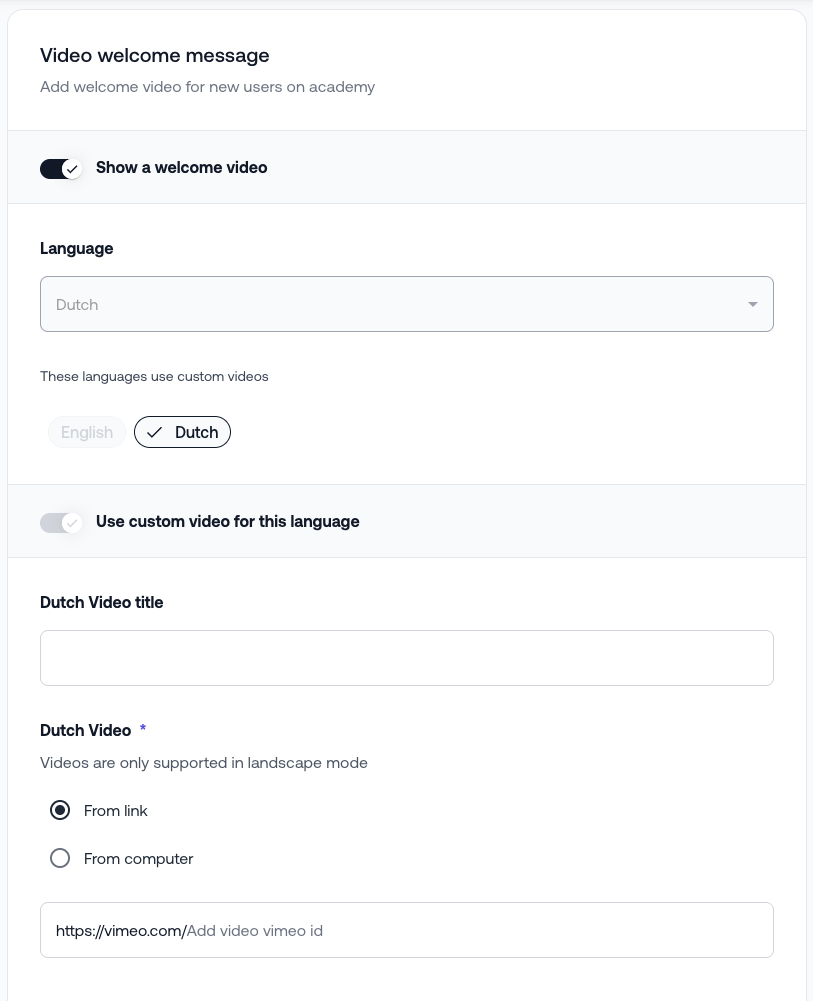
Enable "Show welcome video"
Enter a name for the video
Upload a video or paste a Vimeo link
Add a short introductory message below the video
Multilingual academies: different videos per language
If your academy supports multiple languages and you want a different video for each language:
Select the preferred language
Tick "Use a custom video for this language"
Repeat the upload steps for that language
Was this article helpful?
That’s Great!
Thank you for your feedback
Sorry! We couldn't be helpful
Thank you for your feedback
Feedback sent
We appreciate your effort and will try to fix the article