When a learning item is mandatory for a qualification but not visible to the employee, the employee can submit an access request.
In this article, we explain how the system determines who receives the email in case of:
Notifications about learning activity visibility (employee does not have access to a learning item within the qualification)
Notifications about ‘broken’ learning items (for example, missing approvers or deleted learning items)
Setting contact persons on a qualification
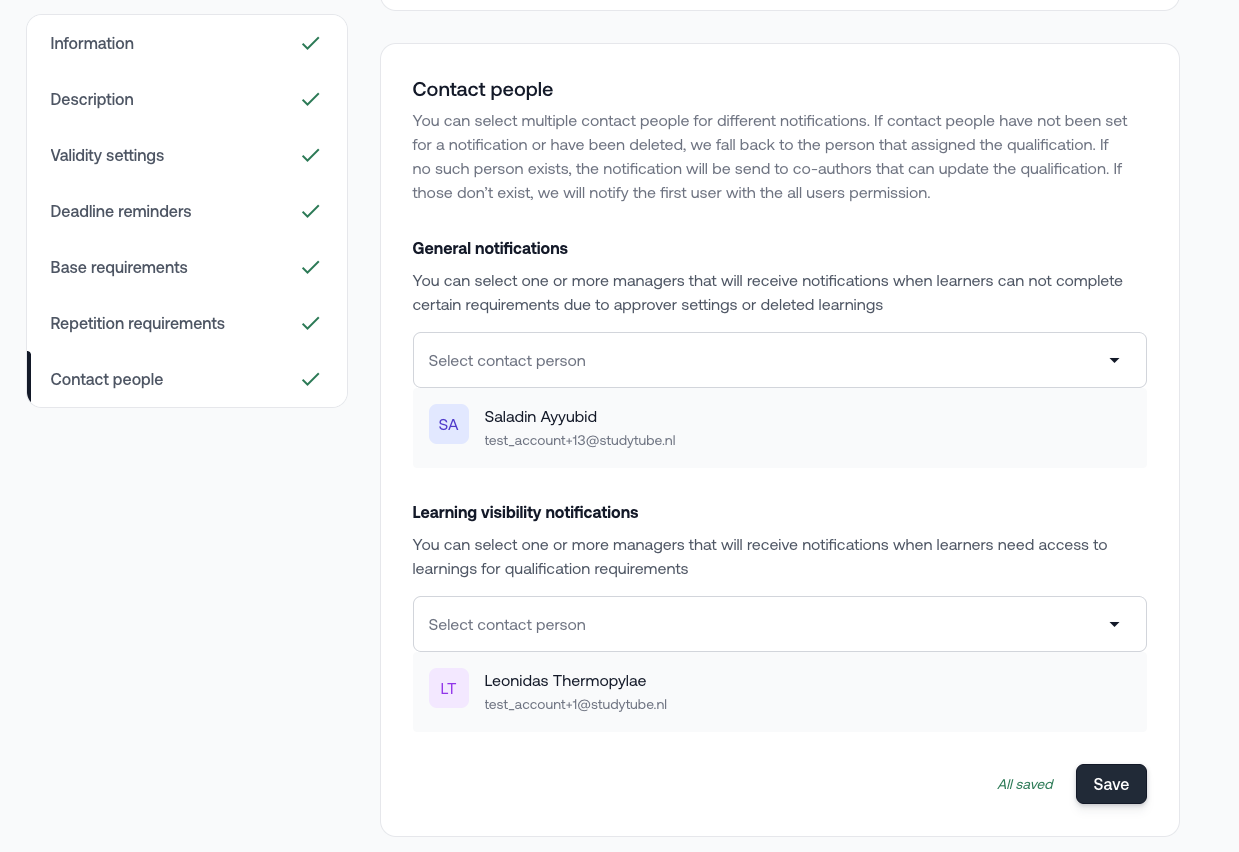
You can assign one or more contact persons to a qualification.
For each contact person, you can determine whether they want to receive emails for:
General notifications
Notifications when employees cannot complete certain requirements due to approval settings (missing approver) or deleted learning activities
Notifications about learning activity visibility
Notifications when employees need access to learning activities for qualification requirements
This allows you to assign the correct responsible person per notification type.
You can find this setting at the bottom of the general settings of the qualification itself.
How does the system determine the email recipient?
The system follows the order below.
1. Are contact persons configured?
Yes → Check per notification type
The system checks, per notification type, who has been assigned.
Is a contact person configured for this type of notification?
→ Then this contact person receives the email.Is no contact person configured for this type of notification?
→ Then the system follows the default fallback order (see below).
No → Default fallback order
If no contact persons are configured on the qualification, the following order applies:
The qualification assigner
The user who assigned the qualification receives the email (current behavior).Co-authors with update rights
Is there no assigner?
Then the email is sent to all co-authors who are allowed to update the qualification.First manager with ‘all users’ rights
If none of the above applies,
then the email is sent to the first manager with the ‘all users’ right.
Partially configured contact persons
Are contact persons configured, but not for both notification types?
Then the following applies:
For the configured notification type → the selected contact person receives the email.
For the non-configured notification type → the system follows the default fallback order (as described above).
Examples
Scenario 1
Qualification with:
Contact person → John A (only for learning visibility notifications)
Assigner → Bob B
Co-authors →
Jane C (only ‘view participants and results’)
Alan D (only ‘update’)
Situation 1: Employee does not have access to a learning item.
→ The email is sent to John A.
Situation 2: Approvers are missing for a manual approval.
→ The email is sent to Bob B.
Scenario 2
Qualification with:
Contact person → John A (only for learning visibility notifications)
Assigner → (empty)
Co-authors →
Jane C (only ‘view participants and results’)
Alan D (only ‘update’)
Situation 1: Employee does not have access to a learning item.
→ The email is sent to John A.
Situation 2: Approvers are missing.
→ The email is sent to Alan D (co-author with update rights).
Scenario 3
Qualification with:
Contact person → John A (only for learning visibility notifications)
Assigner → (empty)
Co-authors → (empty)
Situation 1: Employee does not have access to a learning item.
→ The email is sent to John A.
Situation 2: Approvers are missing.
→ The email is sent to the first manager with ‘all users’ rights.
Scenario 4
Qualification with:
Contact person → John A (for both notification types)
Assigner → Bob B
Co-authors →
Jane C (only ‘view participants’)
Alan D (only ‘update’)
In both cases:
No access to a learning item
Missing approvers
→ The email is sent to John A.
Important to know
The email is never sent to the employee themselves.
You can configure per qualification who is responsible for which notifications.
If no contact persons are configured, the existing behavior remains active, with one additional step: co-authors with update rights.
Do you have questions about access requests or configuring contact persons?
Please contact our support department.
Was this article helpful?
That’s Great!
Thank you for your feedback
Sorry! We couldn't be helpful
Thank you for your feedback
Feedback sent
We appreciate your effort and will try to fix the article